5 Ways to Use ChatGPT at Work: Your AI Co-Pilot for Super Productivity
Drowning in emails, struggling to kickstart that big project, or wishing you had an instant research assistant? What if you could conjure up brilliant solutions and save hours every day with a smart AI by your side? This lesson unveils five game-changing ways ChatGPT can transform your workday into a breeze.
Overview
ChatGPT has emerged as a transformative tool for professional productivity, capable of handling a wide range of workplace tasks that previously consumed hours of employee time and mental energy. This guide explores five distinct, practical applications of ChatGPT in a work context—from drafting polished communications to brainstorming innovative solutions, summarizing dense documents, learning new concepts, and repurposing content across platforms. Rather than replacing human judgment and expertise, ChatGPT functions as a collaborative AI co-pilot that amplifies your existing capabilities, allowing you to work faster, think more creatively, and focus your energy on higher-value strategic work.
What You'll Learn
- Use ChatGPT to draft professional communications with clarity and appropriate tone
- Leverage ChatGPT as a brainstorming partner to generate creative solutions and innovative ideas
- Extract key insights and actionable items from lengthy documents and meeting notes
- Quickly learn and understand complex business concepts and industry jargon
- Repurpose content across multiple platforms with audience-specific tailoring
- Apply the RCTFC prompting framework to achieve more accurate and usable outputs from ChatGPT
The Communication Catalyst: Drafting Clarity and Charisma
One of ChatGPT's most immediately valuable applications is serving as your personal communication co-pilot. Writer's block and communication anxiety are common professional challenges—staring at a blank screen, wrestling with the right words, or second-guessing tone and message structure can consume far more time than the actual task warrants. ChatGPT addresses this by providing rapid, contextually aware drafts that you can then refine to match your voice and intentions. The key to leveraging ChatGPT effectively for communication lies in specificity. Rather than simply asking the tool to "write an email," you should provide clear context about your role, the situation, the recipient's expectations, and the desired tone. This might include details about a recent event (such as a workshop), the purpose of the communication (gratitude, promotion, information sharing), and any links or resources to reference. When you frame a communication task this way, ChatGPT can generate drafts that capture professionalism, warmth, clarity, and appropriate length in a single attempt. Communication tasks that benefit from ChatGPT's assistance include email drafting, meeting agendas, internal announcements, client updates, and any scenario where you need to convey information persuasively while respecting the reader's time. The tool can adapt tone quickly—making text more formal for executives, friendlier for team members, or more urgent for time-sensitive matters—provided you clearly specify these tonal requirements.
- Clarity is King: Provide specific context, including your role, the situation, the recipient, and the purpose of the communication. The more detail you include, the more accurate and usable ChatGPT's output will be.
- Tone Matters: Always explicitly specify the desired tone (professional, friendly, urgent, empathetic, encouraging). ChatGPT can match virtually any tone if you name it clearly.
- Structure for Success: Using a structured prompting approach like RCTFC (Role, Context, Task, Format, Constraints) ensures you cover all necessary information, leading to more accurate and usable drafts on the first attempt.
- Conciseness Counts: Specify word limits or length constraints to ensure the output respects readers' time and aligns with your communication norms.
Lab: Lab Exercise
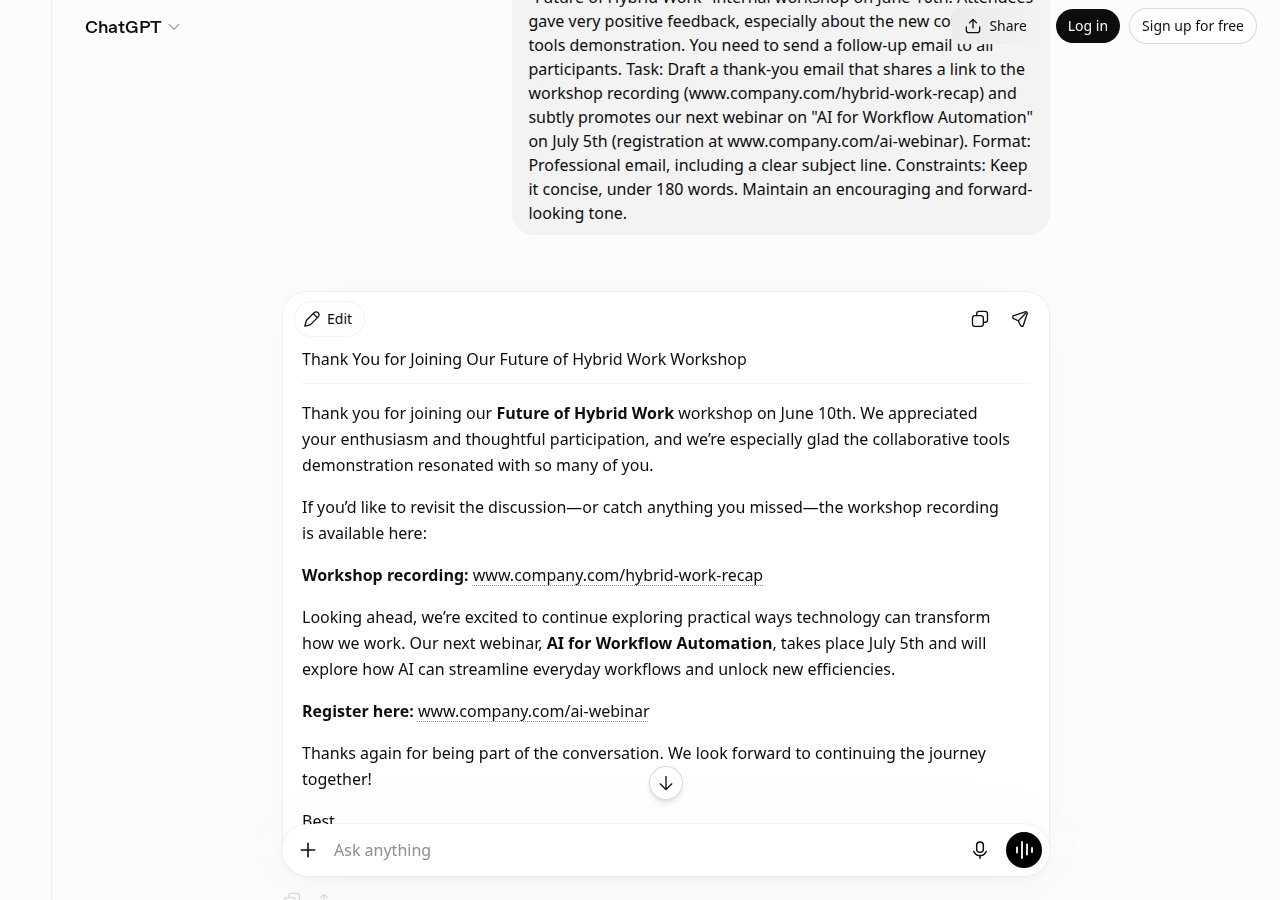
Consider a scenario where you are a Senior Marketing Manager who has just concluded a "Future of Hybrid Work" internal workshop on June 10th. Attendees provided positive feedback, especially about a new collaborative tools demonstration. You need to send a follow-up email thanking participants, sharing the workshop recording link (www.company.com/hybrid-work-recap), and subtly promoting an upcoming webinar on "AI for Workflow Automation" scheduled for July 5th. Using the RCTFC framework, your prompt to ChatGPT might be: "Role: Senior Marketing Manager. Context: I recently concluded our 'Future of Hybrid Work' workshop on June 10th with very positive attendee feedback, especially about the collaborative tools demo. I need to send a follow-up thank-you email. Task: Draft a thank-you email to workshop participants. Format: Professional email with a clear subject line. Constraints: Keep it under 180 words, maintain an encouraging and forward-looking tone, include the recording link (www.company.com/hybrid-work-recap) and subtly promote the July 5th 'AI for Workflow Automation' webinar (registration at www.company.com/ai-webinar)." ChatGPT would generate a polished draft that opens with gratitude, acknowledges the positive feedback on specific content (the collaborative tools demonstration), provides the recording link for those who missed it or want to revisit material, and naturally weaves in the next event as a logical progression of the learning journey. The draft would maintain professional tone while sounding warm and inclusive, all within the 180-word constraint. You would then review this draft, make any adjustments to align with your personal voice or organizational style, and send it—saving the 15-20 minutes of composition and revision time that this task would normally require.
The Idea Incubator: Brainstorming and Creative Problem-Solving
Beyond drafting existing content, ChatGPT functions as a powerful brainstorming partner—a creative thought catalyst that can generate multiple perspectives, innovative angles, and novel solutions without the fatigue or awkwardness of traditional brainstorming sessions. When you face a creative challenge or strategic problem, ChatGPT can rapidly produce numerous ideas, each with distinct approaches and angles, allowing you to explore possibilities that might not emerge in a typical brainstorming meeting. The effectiveness of ChatGPT as a brainstorming partner depends heavily on how specifically you frame the challenge. Simply asking for "ideas" will produce generic suggestions; instead, you should define your target audience, product category, problem constraints, content platform, or any other relevant parameters. The more detailed your context, the more tailored and actionable ChatGPT's suggestions become. Additionally, you should specify the quantity and format of ideas you want—requesting a specific number of suggestions encourages ChatGPT to vary its output rather than repeating similar concepts. Crucially, ChatGPT's first output is rarely the final answer. The brainstorming process is iterative: you review the initial suggestions, identify which directions resonate, and then prompt ChatGPT again with refinement requests. This might involve asking it to combine certain ideas, explore new angles based on feedback, remove generic elements, or deepen specific promising directions. This collaborative, iterative approach transforms ChatGPT from a simple generator into a true creative partner.
- Be Specific with Your Niche: Define your target audience, product, market segment, or problem domain in detail. Generic brainstorming produces generic ideas; specific context produces tailored suggestions.
- Quantity and Quality: Don't just ask for "ideas"—specify exactly how many you want and include constraints that guide the type and quality. For example, "10 distinct content ideas avoiding generic sales pitches" is far more effective than "give me social media ideas."
- Iterate, Don't Just Accept: Treat the first output as a starting point, not a final product. Ask ChatGPT to refine, combine, eliminate generic elements, or explore new angles based on which concepts resonated with you.
- Avoid Siloing: Combine ChatGPT's brainstorming with your expert judgment. Use it to expand your thinking, challenge assumptions, and generate volume, but apply your domain knowledge to evaluate feasibility and fit.
Lab: Lab Exercise
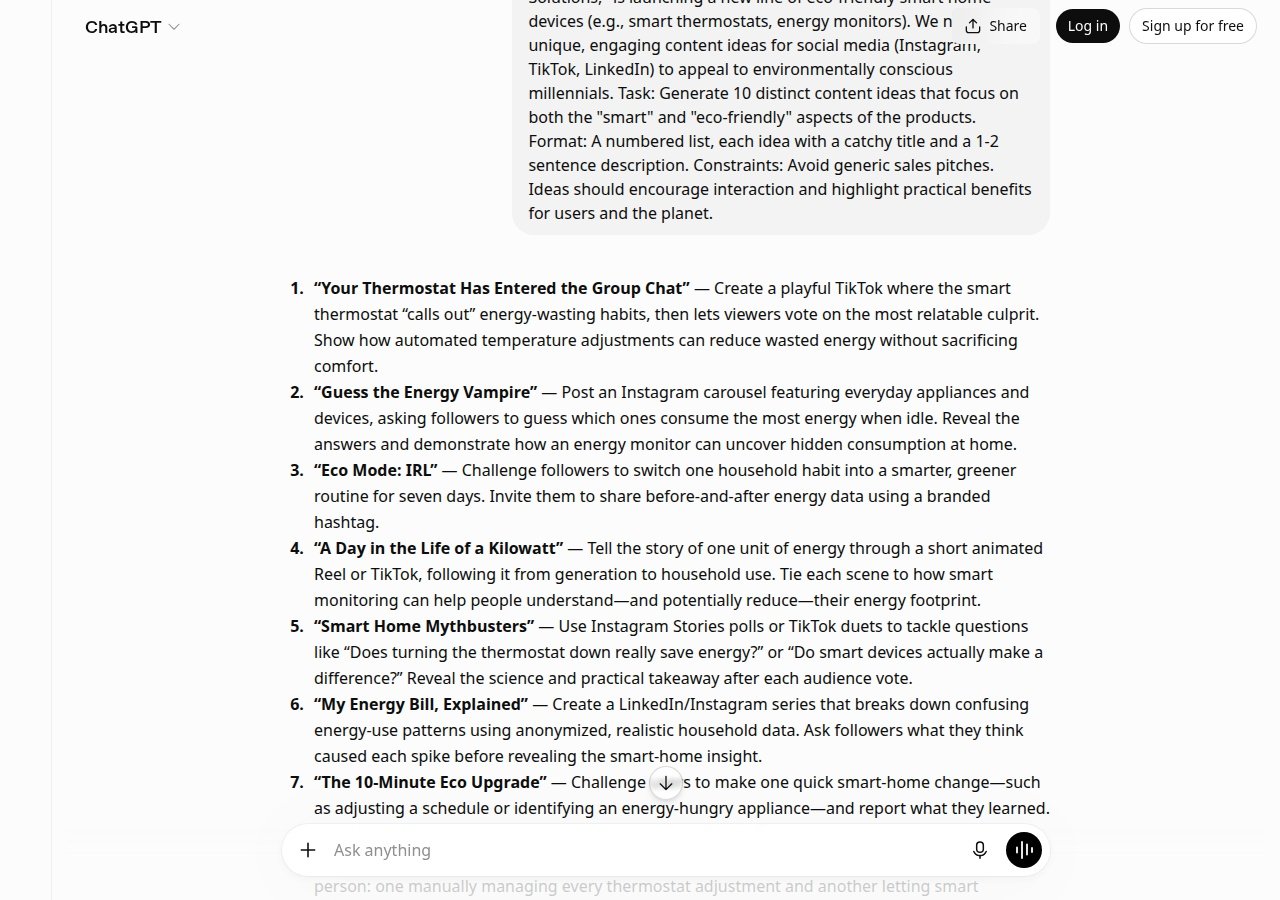
Imagine you are a Marketing Strategist for "GreenTech Solutions," a company launching a new line of eco-friendly smart home devices (smart thermostats, energy monitors, etc.). Your target market is environmentally conscious millennials, and you need fresh content ideas for social media platforms (Instagram, TikTok, LinkedIn). Your task is to generate ideas that emphasize both the "smart" and "eco-friendly" aspects while avoiding generic sales language and encouraging audience interaction. Your prompt to ChatGPT might read: "Role: Marketing Strategist for GreenTech Solutions. Context: We're launching a new line of eco-friendly smart home devices (smart thermostats, energy monitors). Target audience: environmentally conscious millennials. Task: Generate 10 distinct content ideas for social media. Format: Numbered list with a catchy title and 1-2 sentence description for each. Constraints: Focus on both 'smart' and 'eco-friendly' aspects, avoid generic sales pitches, highlight practical benefits for users and the planet, encourage audience interaction." ChatGPT might then produce suggestions such as: "Before-and-After Energy Savings Stories" (real user testimonials showing kWh reductions), "Carbon Footprint Calculator Challenge" (interactive tool letting followers calculate personal impact and compare with smart home solutions), "Smart Home Fails vs. Green Wins" (humorous comparison content), "Myth-Busting Series" (addressing misconceptions about energy efficiency), or "Behind-the-Scenes Sustainability" (showing the eco-friendly manufacturing process). These ideas go beyond generic "Check out our new product" messaging because they are tailored to millennial values and communication preferences. Reviewing these suggestions, you might realize that the interactive and educational angles resonate most with your strategy. You could then prompt ChatGPT again: "These are great. Can you expand on the 'Myth-Busting Series' and 'Carbon Footprint Calculator Challenge' with 3-5 specific myths/myths to debunk and 3-5 specific calculator scenarios? Make them surprising or counterintuitive so they spark conversation." This iterative refinement transforms raw brainstorming into actionable campaign direction.
The Information Architect: Summarizing and Extracting Key Insights
Modern work generates an overwhelming volume of information: lengthy reports, dense articles, sprawling meeting notes, email threads, and documentation. While this information is theoretically valuable, the time required to process it all is a significant productivity drain. ChatGPT serves as your information architect—a tool capable of distilling lengthy text into digestible summaries, extracting key data points, identifying actionable next steps, and transforming scattered notes into organized, concise formats. When you feed ChatGPT a document or meeting notes, it can produce outputs tailored to your specific needs. Rather than asking for a generic summary, specify what you actually need: Are you looking for key decisions made? Actionable next steps? Budget impacts? Timeline changes? By framing your request around the information that matters most to your context, ChatGPT produces outputs that you can immediately act on rather than outputs that require further synthesis. This capability is particularly valuable in fast-paced professional environments where meetings happen back-to-back and information must be quickly communicated to broader teams. Instead of spending 20-30 minutes after a meeting distilling notes into a crisp summary, you can paste the raw notes into ChatGPT and receive a concise, organized version in seconds. The format can be customized to match your team's preferences—bullet points, numbered lists, organized by topic, or structured by decision/impact/timeline. Accuracy improves when you specify constraints, such as "include only decisions made and immediate next steps, excluding background discussion." Beyond meeting notes, this tool is equally powerful for extracting insights from research documents, market reports, competitive analyses, and any scenario where you need to quickly identify the essential information within a larger body of text.
- Define Your Purpose: Don't ask for a generic summary. Specify what information matters most to you—decisions, action items, budget impacts, timeline changes, risks—so ChatGPT can prioritize accordingly.
- Provide Complete Source Material: Paste the full text you want to condense directly into your prompt. This ensures accuracy and context preservation, and saves you explanation time.
- Structure the Output: Specify your desired output format (bullet points, numbered list, organized by topic, structured by decision/action/timeline) so the result immediately fits your team's needs.
- Set Clear Constraints: Define boundaries such as "focus only on decisions and immediate next steps" or "exclude background discussion" to keep outputs concise and action-focused.
Lab: Lab Exercise
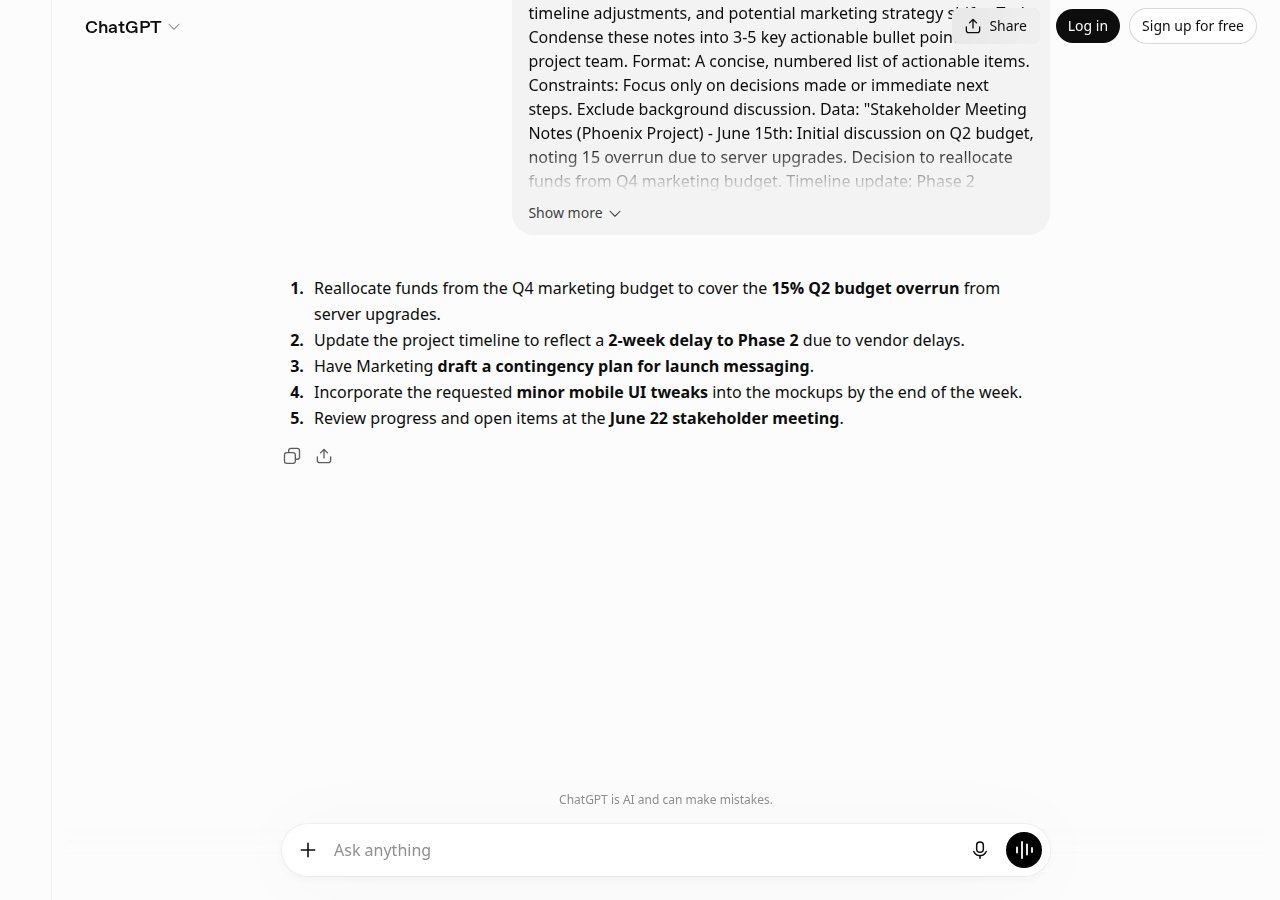
Consider a scenario where you are a Project Manager for the "Phoenix Project" and you have just received summarized notes from a 2-hour stakeholder meeting conducted on June 15th. The notes cover several topics: budget concerns, timeline adjustments, and marketing strategy implications. Your task is to condense these notes into 3-5 key actionable bullet points for your project team. Your prompt to ChatGPT might be: "Role: Project Manager. Context: I've received notes from a 2-hour stakeholder meeting about the Phoenix Project (June 15th). Task: Condense these notes into 3-5 key actionable bullet points for the project team. Format: Numbered list of actionable items. Constraints: Focus only on decisions made or immediate next steps; exclude background discussion. Here are the meeting notes: [paste full notes]." The meeting notes might contain: "Initial discussion on Q2 budget, noting 15% overrun due to server upgrades. Decision to reallocate funds from Q4 marketing budget. Timeline update: Phase 2 pushed by 2 weeks due to vendor delays. Marketing to draft contingency plan for launch messaging. Discussed new UI mockups, general approval with minor tweaks requested for mobile view by end of week. Next meeting: June 22nd." ChatGPT would produce output such as: "1. Reallocate Q4 marketing budget to cover Q2 server upgrade overrun (15%). 2. Phase 2 timeline extended by 2 weeks due to vendor delays; update project schedule. 3. Marketing team to draft contingency plan for launch messaging. 4. UI mockups approved pending mobile view revisions due end of week. 5. Next stakeholder meeting scheduled: June 22nd." These five items give your project team the specific decisions and actions they need to move forward, without requiring them to parse the full meeting transcript. The format is immediately actionable, and the information is prioritized by relevance.
The Instant Educator: Learning Complex Concepts On Demand
Professional environments are filled with jargon, specialized terminology, and complex concepts that are often assumed knowledge in meetings and conversations. Whether it's "synergistic ecosystem," "dynamic capability," "KPI Tree," or emerging business frameworks, gaps in understanding can create anxiety and prevent you from contributing fully to discussions. ChatGPT serves as your private, on-demand tutor—available 24/7 to clarify terminology, explain processes, and demystify complex ideas without judgment or embarrassment. The key to using ChatGPT effectively as an educator is signaling your desired level of explanation. If you simply ask for a definition, you may receive technical or jargon-filled text that doesn't actually help you understand. Instead, explicitly request simplicity: ask for explanations "in simple terms," "for someone new to this concept," or "for a non-technical audience." Additionally, analogies are extraordinarily effective for making abstract concepts concrete and memorable. ChatGPT excels at generating relatable analogies—if you specifically request one, it will provide a comparison that makes the concept stick. Context also matters. If you tell ChatGPT why you need the explanation—such as "I need to understand this to contribute in tomorrow's meeting" or "I need to explain this concept to a client"—it can tailor the depth and focus of its response accordingly. Urgent meeting contexts might warrant brief, focused explanations, while client communication might require both simplicity and evidence of credibility. By defining your use case, you make ChatGPT's response far more useful.
- Specify Simplicity: Always request explanations "in simple terms," "for a beginner," or "for someone unfamiliar with this field." Don't assume ChatGPT knows your knowledge level.
- Request Analogies: Analogies make abstract or complex ideas concrete and memorable. Specifically ask for one; ChatGPT is skilled at generating relatable comparisons.
- Define Your Use Case: Explain why you need the explanation (for a meeting, to explain to a client, to understand a report) so ChatGPT can tailor depth and focus appropriately.
- Build Understanding Iteratively: If the first explanation doesn't fully clarify the concept, ask follow-up questions. "How does this relate to [similar concept]?" or "Can you give me an example of this in practice?" deepens understanding.
Lab: Lab Exercise
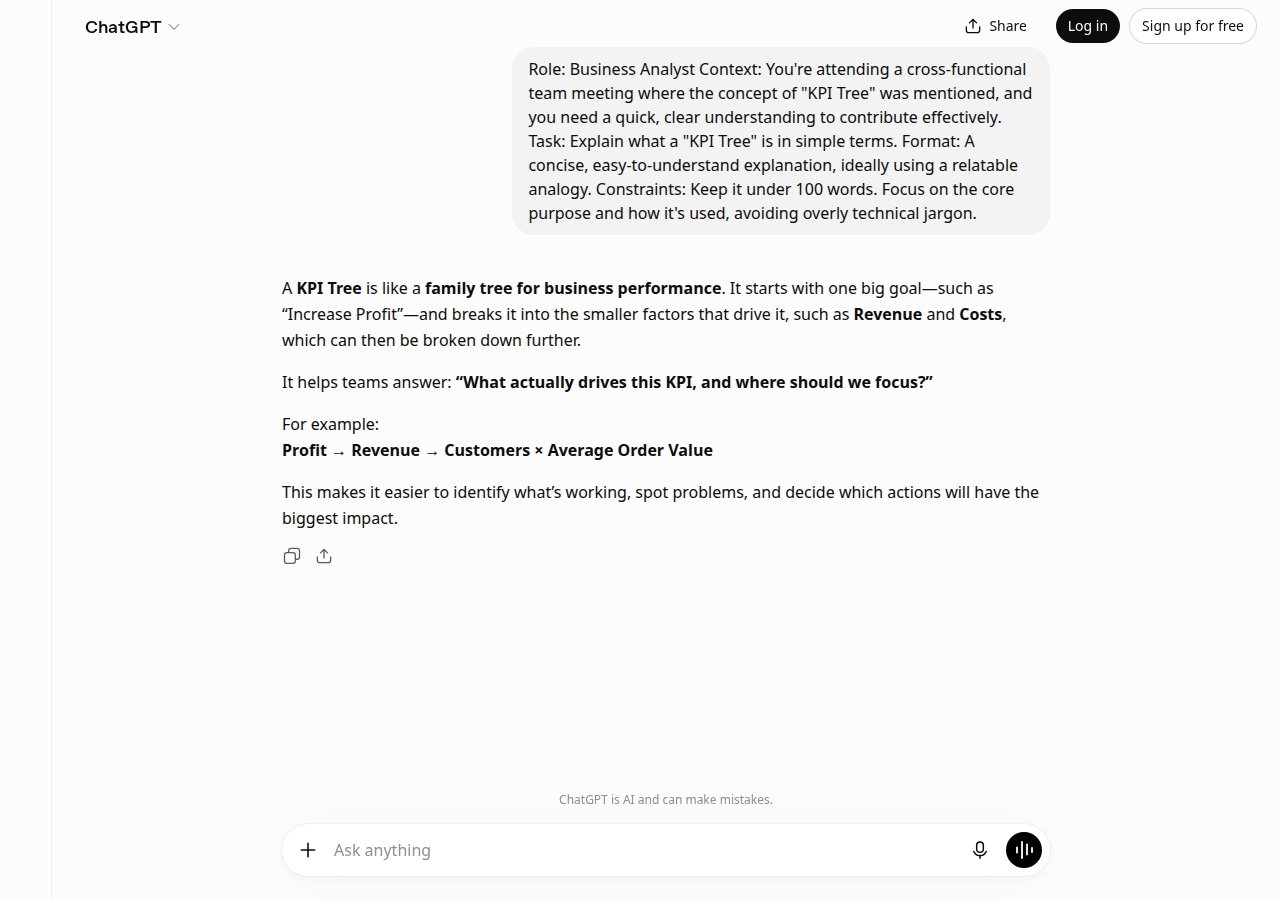
Imagine you are a Business Analyst attending a cross-functional team meeting where the concept of "KPI Tree" is mentioned. You want to contribute meaningfully but realize you don't fully understand what a KPI Tree is or how it's used. Rather than silently nodding and hoping context clues emerge, you turn to ChatGPT. Your prompt might be: "Role: Business Analyst. Context: KPI Tree was just mentioned in a meeting I'm attending, and I need a quick, clear understanding to contribute effectively. Task: Explain what a 'KPI Tree' is in simple terms. Format: Concise, easy-to-understand explanation, ideally with a relatable analogy. Constraints: Keep it under 100 words, focus on core purpose and how it's used, avoid overly technical jargon." ChatGPT might respond with something like: "A KPI Tree is a visual hierarchy of performance metrics shaped like a tree. The 'trunk' is your primary business goal (e.g., 'increase revenue'). The 'branches' break this into sub-goals (e.g., 'grow customer base,' 'increase customer lifetime value'). The 'leaves' are the specific, measurable KPIs (Key Performance Indicators) that drive each sub-goal. Think of it as a family tree where the ancestor (main goal) has descendants (detailed metrics) that all contribute to the family's overall success. It helps teams align efforts by showing how individual metrics connect to bigger business objectives." With this explanation, you now understand that a KPI Tree is fundamentally an organizational tool that cascades business objectives into measurable, actionable metrics. The tree analogy makes the hierarchical nature intuitive. Armed with this understanding, you can participate in the meeting discussion knowledgeably, ask informed follow-up questions if needed, and understand how KPIs being discussed relate to overall business strategy.
Summary
ChatGPT represents a fundamental shift in how professionals can approach routine and creative tasks. By serving simultaneously as a communication catalyst, creative brainstorming partner, information architect, on-demand educator, and content adapter, ChatGPT amplifies individual productivity across multiple dimensions of professional work. The five applications explored in this guide—drafting communications, brainstorming solutions, summarizing information, learning concepts, and repurposing content—each address genuine pain points in modern work environments: writer's block, ideation fatigue, information overload, knowledge gaps, and content duplication. Crucially, ChatGPT's value is not in replacing human expertise or judgment, but in augmenting it. The tool excels at rapid ideation, initial drafting, information synthesis, and format adaptation—exactly the types of cognitively demanding but time-consuming tasks that previously consumed hours of professional attention without providing significant satisfaction. By delegating these tasks to ChatGPT, you reclaim time and mental energy for higher-order thinking: evaluating ideas, making strategic decisions, applying domain expertise, and driving results that matter. The RCTFC framework ensures that you leverage ChatGPT effectively by providing comprehensive, well-structured context that produces immediately useful outputs requiring minimal revision. Success with ChatGPT comes not from memorizing the tool's capabilities, but from developing a mindset of structured, iterative collaboration—treating it as a thoughtful partner that responds to clarity and specificity with proportional quality and relevance.
Next Steps
Begin by selecting one task from your current workload that you typically dread or that consistently consumes disproportionate time—whether that's drafting client emails, brainstorming campaign ideas, summarizing meeting notes, or explaining concepts to colleagues. Apply the RCTFC framework to construct a detailed prompt for ChatGPT, paying particular attention to providing sufficient context and clear constraints. Review the output, iterate if needed by providing feedback or refinement requests, and track how much time you save compared to your usual process. As you grow comfortable with this first application, expand to other tasks across the five categories described in this guide. Share your successful prompts and ChatGPT collaborations with colleagues—you'll likely discover that others have creative applications and refinements worth adopting. The goal is not to use ChatGPT for everything, but to systematically offload routine cognitive work, freeing your expertise and attention for work that genuinely requires human judgment and creativity.